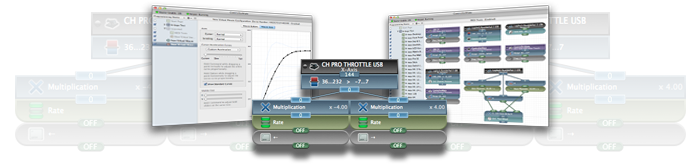
ControllerMate v4.11.1
October 10, 2018
Compatible with macOS 10.13 High Sierra and macOS 10.14 Mojave
Previous versions can be downloaded for older versions of macOS
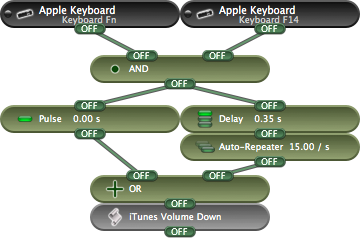
Building functions, one block at a time
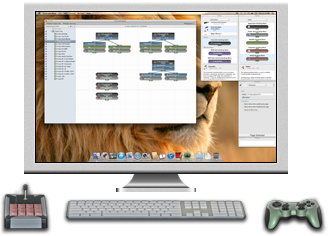
ControllerMate building blocks are triggered by controls on devices or MIDI messages. Each type of building block performs a small task. Building blocks can be combined to perform complex functions.
ControllerMate now includes more than 70 types of building blocks!
Some building blocks respond directly to controls on devices. Others perform logic, math, or timing. Yet other blocks trigger activity on ControllerMate's virtual mouse or keyboard, perform AppleScripts, open files, or launch applications. The possibilities are virtually limitless.
Reconfigure drivers
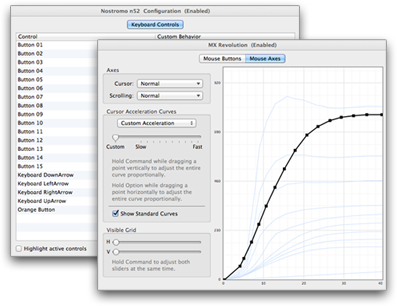
Driver configurations can be used to change the default behavior of a keyboard or mouse that uses ControllerMate's driver.
All buttons on a keyboard have some default function or another. Most are useful, some are not. A driver configuration allows one button on a keyboard act like another, or can turn a button off completely. Buttons that have been turned off can still be used to trigger building blocks.
A driver configuration for a mouse can include a custom acceleration curve. This curve can be one of the standard curves, a standard curve with an adjusted speed or sensitivity, or an entirely custom curve created point by point.
Multiple configurations can be created for the same keyboard or mouse — use building blocks to control when a configuration is active.

MIDI in, MIDI out
MIDI messages can now trigger building blocks just as easily as buttons on a joystick, mouse, or keypad. MIDI notes, controller values, or patch changes can be used.
ControllerMate can also create and send MIDI messages through a virtual MIDI source. This allows generic input devices to be used to control applications that listen to ControllerMate's virtual MIDI source.
Virtual devices
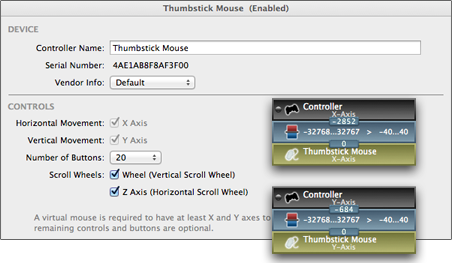
ControllerMate can create virtual mouse, tablet, and joystick devices that are controlled by ControllerMate programming. The virtual devices are seen by most other applications just as though they were actual devices.
Every move that a virtual device makes is controlled using ControllerMate's building blocks and driver configurations.

Out of sight, never out of reach
ControllerMate includes a helper application that runs in the background, monitors the attached controllers, and performs the current programming when the ControllerMate application is not running.
After you have finished setting up your building blocks and driver configurations, quit the ControllerMate application and the background application takes over. No graphics, no user interface, no unnecessary processor cycles.
Free to try!
ControllerMate is compatible with many types of devices and can perform a wide variety of tasks. Give ControllerMate a try to find out if it will work for you, risk free, and with no time limit.
When ControllerMate is used without registration there will be a limit of 10 building blocks that generate output (keyboard or mouse activity, MIDI messages, AppleScripts, etc.). Building blocks that respond to controls or MIDI messages, perfom logic, math, or timing can be created in unlimited numbers. This should give you a good opportunity to find out how ControllerMate works and if it will work for you.

New in ControllerMate v4.11.1
- Fixes an issue that would cause ControllerMate’s background to sometimes reset a device’s driver to its default configuration instead of using custom Driver Configuration settings.
- Fixes an incompatibility between macOS 10.14 Mojave and some scripts that were run using ControllerMate’s AppleScript building blocks.
- Improves the compatibility with some versions of the X-keys XKE-124 T-bar to hide the unused joystick interface.
ControllerMate v4.11
- Support for Mojave Dark Mode.
- The current user’s preferred system colors are now used more consistently in ControllerMate’s interface.
- The Keystrokes Palette is now resizable.
- A Backlight Intensity building block has been added to control the brightness of the X-keys XK-128 and XKE-124 T-bar backlights.
- The Text and Keystrokes building blocks no longer activate the Output window unless they actually generate keyboard activity.
ControllerMate v4.10.4
- ControllerMate v4.10.4 includes a minor change to fix sluggish performance that could occur when viewing the Controller Information panel for certain devices.
- ControllerMate for X-keys v4.10.4 includes a fix for the system extension approval process in macOS 10.13 High Sierra.
ControllerMate v4.10.3
- ControllerMate v4.10.3 provides more helpful information when its driver is not loaded while running on macOS 10.13 High Sierra. This should help users navigate the new High Sierra system extension approval process more quickly.
- ControllerMate v4.10.3 also handles Bluetooth LE devices in the same manner as earlier Bluetooth devices. This should improve compatibility with newer Bluetooth devices.
ControllerMate v4.10.2
- ControllerMate v4.10.2 improves the compatibility of keyboard-related building blocks (Keystrokes, Single Key, Text) with some applications when running on macOS 10.12 Sierra. Applications that did not respond to keyboard activity that was indicated by the system's Keyboard Viewer should now respond properly.
ControllerMate v4.10.1
- ControllerMate v4.10.1 improves the compatibility of ControllerMate's background helper with macOS 10.12 Sierra. This update addresses potential differences in behavior that may occur when the helper alone is running (as compared to when the ControllerMate application is running), or differences in behavior of the helper application when it launches automatically compared to when it is stopped and then restarted manually.
- Examples of behavior that this update addresses are building blocks that may not respond quickly to buttons, and delays between control activity and the ControllerMate outputs that they trigger. This update should allow the helper to run with the same priority, and achieve the same performance, as the ControllerMate application.
ControllerMate v4.10
- Improved compatibility with macOS 10.12 Sierra
- Added the ability to position the cursor relative to a window with a specific name in addition to the currently active window.
Previous Versions
ControllerMate v4.10.4 can be used with macOS 10.12
ControllerMate v4.9.10 can be used with Mac OS X 10.8 — 10.11
ControllerMate v4.8.3 can be used with Mac OS X 10.6 (64-bit) and 10.7
ControllerMate v4.5.3 can be used with Mac OS X 10.4/10.5 and Mac OS X 10.6 (32-bit)
Copyright © 2005 — 2018 OrderedBytes. All rights reserved.